
Password Security: How to Create and Manage Strong Passwords
Let me start with a number: 16 billion. In June 2025, researchers discovered the largest single credential leak ever recorded — 16 billion login records for platforms including Google, Apple, and Facebook, all exposed in one massive dataset. Check Point reported that credential theft volume surged 160% compared to the previous year. The problem isn't getting better — it's accelerating.
Password security isn't paranoia — it's basic hygiene at this point. And yet, "P@ssw0rd123!" remains one of the most commonly used passwords. This guide is for anyone who's ever reused a password, written one on a sticky note, or genuinely believed their birthday was a secure choice.
The Math Behind Password Strength
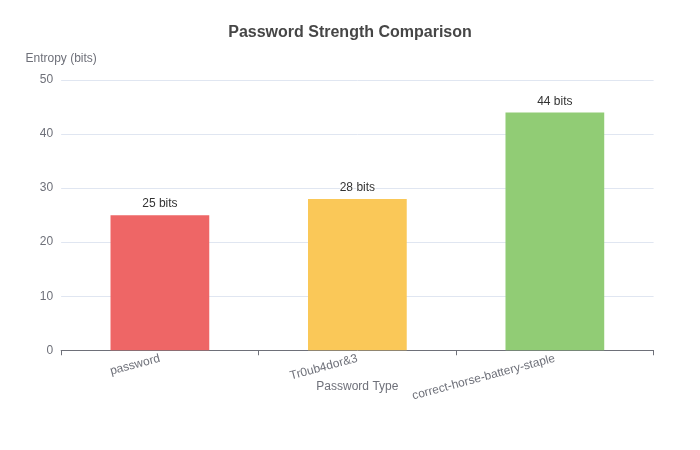
Here's something that surprised me when I actually did the calculation: a password like "Tr0ub4dor&3" looks secure, but it's actually weaker than "correct-horse-battery-staple" because of how entropy works.
Password entropy measures unpredictability. A character from a 26-letter alphabet gives you 4.7 bits of entropy. Include upper/lowercase, numbers, and symbols? Maybe 6 bits per character.
Now compare:
- "Tr0ub4dor&3" = ~18 characters, predictable patterns = ~28 bits entropy
- "correct-horse-battery-staple" = 28 characters, random words = ~44 bits entropy
The longer, random passphrase wins. Every time.
How Attackers Actually Crack Passwords
Forget the Hollywood hacking scenes. Real password attacks are either:
1. Credential stuffing: They take leaked email/password pairs from one breach and try them everywhere. This works because ~65% of people reuse passwords.
2. Dictionary attacks: Automated tools try common passwords, dictionary words, and known patterns. The password "admin" gets cracked in milliseconds. "qwerty" takes about the same.
3. Rainbow tables: Pre-computed hash tables that reverse password hashes. This is why salting passwords is essential — unique salts make rainbow tables useless.
What doesn't work (usually): brute-forcing random characters. The math just doesn't work out. A 12-character random password with all character types has about 95^12 combinations — that's 95 trillion possibilities. Even at a billion attempts per second, that's still years of computation.
The Password Manager Argument
I've had this conversation dozens of times: "What if the password manager gets hacked?"
Here's the thing — password managers are designed to be hacked. They assume the database will be compromised. That's why they use:
- Zero-knowledge architecture: The service never sees your actual passwords, only encrypted blobs
- Strong master password derivation: Your master password becomes a key, not just a password
- Local-first encryption: Decryption happens on your device, not on their servers
Even if Bitwarden or 1Password's servers are breached, the attackers get encrypted gibberish. The only thing they could try to crack is your master password — which brings us back to the earlier point about length and entropy.
My recommendation: Bitwarden for most people (free, open source), 1Password if you want polished UX. Both are solid.
What About Passkeys?
Passkeys are the new kid on the block, and honestly, they're pretty exciting. Instead of remembering a password, you use your device's biometric authentication (Face ID, fingerprint) or PIN.
Under the hood, passkeys use public-key cryptography. The server stores a public key; your device holds the private key. Even if the server is breached, there's nothing useful for attackers.
Adoption is growing — Google, Apple, Microsoft, GitHub, and many banks now support passkeys. I expect them to become the default within 2-3 years for most services.
For now, the best strategy: use a password manager for most accounts, enable passkeys where available, and enable 2FA everywhere possible.
Two-Factor Authentication: The Extra Layer
Passwords alone aren't enough. 2FA adds a second verification step. The options:
- Authenticator apps (Google Authenticator, Authy): Generate time-based codes. These are tied to your device, not your phone number, which makes them immune to SIM-swapping attacks.
- SMS codes: Better than nothing, but SMS is interceptable. Avoid if possible.
- Hardware keys (YubiKey): The gold standard. Physical device required for login. Expensive but nearly unhackable.
Priority for 2FA: email > password manager > banking/financial > everything else.
Generating Strong Passwords
When you need a password (for accounts without passkey support), here's how to generate one that actually works:
Use a password generator that creates:
- Minimum 16 characters
- Random characters from all available pools
- No dictionary words unless using the passphrase method
The Password Generator on ToolMixr creates cryptographically random passwords with configurable options. Use it. Don't use your pet's name, your anniversary, or anything else a 15-minute LinkedIn stalk could discover.
The Practical Baseline
If you take nothing else from this article, do these three things:
- Get a password manager. Bitwarden, 1Password, or whatever fits your workflow. Use it for every account.
- Enable 2FA on your email, password manager, and financial accounts. Use an authenticator app, not SMS.
- Check if you've been breached. Use Have I Been Pwned — enter your email and see which breaches exposed your data.
Password security isn't about being perfect. It's about being better than the easiest target. Most breaches aren't sophisticated attacks — they're credential stuffing against people using "password123" on multiple sites.
Don't be that person.